

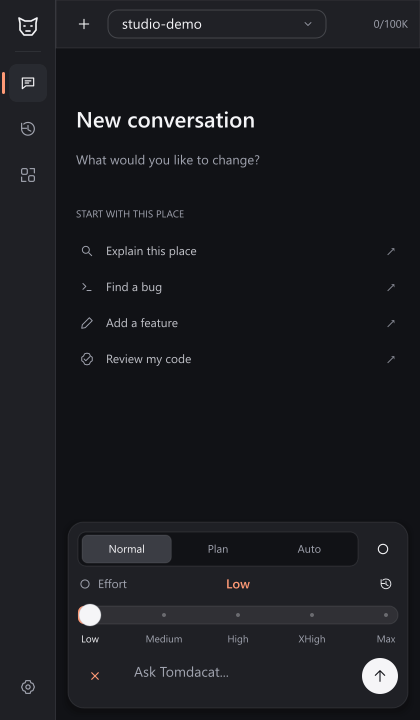
This documentation covers Tomdacat Code v3.3. See the Changelog for the redesigned interface, five-level reasoning slider, higher token limits, and generation-free key verification.
Why it’s different from a generic chatbot
It actually edits your place
Tools operate on the live Roblox DataModel — reading the hierarchy, scripts,
and properties, and writing changes through Studio’s own undo history.
You stay in control
Every mutating tool call can be set to Ask, Always Allow, or
Always Deny per tool.
execute_luau always asks, no exceptions.Streams everything, live
Assistant replies and tool-call arguments fill in token by token, and the
Stop button actually stops mid-stream now — no more waiting it out.
Extensible by design
Skills inject domain playbooks into context on demand, and Connectors add
optional tool capabilities like icon search — both without touching code.
Core building blocks
Chat & streaming
Chat & streaming
A familiar chat UI with markdown rendering (including tables), an
auto-growing input box, slash commands,
@ mentions for instances and
scripts, and a Continue button when the agent hits its tool-call limit.
See Chat & Streaming.Mentions & commands
Mentions & commands
@ pulls real place context — instances, scripts, skills — straight into
your message, and / runs a command instead of sending plain text. See
Mentions & Commands.Tools & permissions
Tools & permissions
A catalog of tools — reading the hierarchy, scripts, and properties;
editing scripts with a real diff view; creating, moving, and deleting
instances; searching scripts; reading the console; and a locked-down
execute_luau escape hatch. See Tools & Permissions.Settings
Settings
One scrolling screen: account and billing, Budget Mode, cost info, default
model, tool permissions, and Skills/Connectors/Memory nav rows, ending in
a double-confirm Danger Zone. See Settings.
Budget Mode
Budget Mode
Flip it on and the agent starts from a single tool —
search_tools —
and has to look up anything else by name before it can call it, cutting
the fixed cost of a big tool catalog on every turn. See Budget Mode.Models & reasoning
Models & reasoning
Switch between every model your Tomdacat AI account can reach, see which
ones support vision or reasoning at a glance, watch reasoning-capable
models think out loud in real time, and dial reasoning effort up or down
per chat. See Models & Reasoning.
Billing: API key or Coding Plan
Billing: API key or Coding Plan
Bring your own per-credit API key, or subscribe to a flat, Robux-billed
Coding Plan — switch between them any time in Settings, with usage
tracked as session, weekly, and premium-model windows. See Billing.
Remote Control
Remote Control
Watch a live session — connection status and a real transcript — from
ai.tomdacat.com/dashboard/code, send it messages from there, and
optionally let the dashboard approve tool calls right alongside Studio
itself. See Remote Control.
Vision & image attachments
Vision & image attachments
Attach a screenshot from disk and ask the agent about it — gated cleanly
to models that actually support vision. See Vision & Images.
Memory
Memory
Persistent Project Memory you write once, plus Auto Memory the agent
writes for itself across sessions — both injected into every system
prompt for this place. See Memory.
Modes
Modes
Normal asks per tool, Plan proposes a plan first, Auto skips every
prompt (with an explicit confirmation to turn it on). See Modes.
Subagents
Subagents
Delegate a task to a background agent with its own model and tool
catalog, tracked in its own rail tab with an unread dot the moment one
finishes. See Subagents.
Skills
Skills
Five built-in playbooks (Luau scripting, DataStores, UI design, 3D
building, game systems) plus your own imported skills, referenced with
@skill:name or the /skill command. See Skills.Connectors
Connectors
Optional capabilities — like the Fluency Icons connector for
search_icons — that you turn on per-project in Settings. See Connectors.Get started
Installation
Install the v3.3 local plugin and connect your Tomdacat AI API key or Coding Plan.
Quickstart
Send your first message and approve your first tool call.