

Changed in v3. It now lives in a tray that slides open when you tap the + next to the
chat input, alongside the image-attach button and, in v3.3, the inline effort slider. The plus springs into × while open. It is no longer a
bar permanently pinned under the composer.
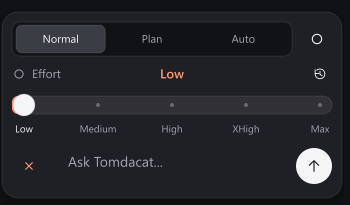
Normal
The default. Every mutating tool call asks first, exactly as described in Tools & Permissions.
Plan
The agent proposes a plan — a short, numbered list of the tool calls it intends to make and why — before touching anything, and waits for you to Approve & Run or Cancel.
Auto
Skips every permission prompt for the rest of the task, including
execute_luau, which normally always asks no matter what.Plan, in detail
With Plan selected, the first reply to a new task is always a plan instead of a tool call — the model is explicitly instructed not to act yet. The plan renders in a blue card with two buttons:- Approve & Run — re-sends the conversation with the plan gate lifted for that one continuation, so the agent now actually executes the calls it described.
- Cancel — leaves the plan sitting in the transcript; nothing further happens.
Auto, in detail
Once confirmed, every tool call — read or mutating — runs immediately with no prompt, for as long as Auto stays selected. An explicit Always Deny you’ve set on a tool is still honored; Auto Mode skips the ask flow, not a deny you configured on purpose. Auto Mode also changes what a spawned subagent is allowed to do: if the main session is in Auto whenspawn_subagent is called, the subagent inherits full unattended access, execute_luau included.